SOLACESOFTWARE / PRODUCT
Solace Pad
Use your Xbox or XInput-compatible controller as a mouse and keyboard across the whole Windows desktop, from the couch. $2.75 once.
One-time payment for the current Windows package plus 12 months of best-effort SolaceSoftware support and packaging updates. No automatic renewal.
14-day refund if the package can't start its core check — see Purchase terms.
Questions before you buy, or help after: solacesoftware@smilingface.cloud. We aim to answer within three business days.
- One-time price, $2.75 USD. No subscription and no automatic renewal.
- Runs on your own Windows PC.
- We publish the size and SHA-256 of the exact ZIP you download, so you can check it.
- Email support, with 12 months of best-effort help included.
This download is unsigned. Windows may say “Windows protected your PC.” We’re a new publisher and haven’t bought a code-signing certificate yet. Click More info → Run anyway. Then check the ZIP against the SHA-256 on this page. Questions: solacesoftware@smilingface.cloud
IN THE APP
Screenshots
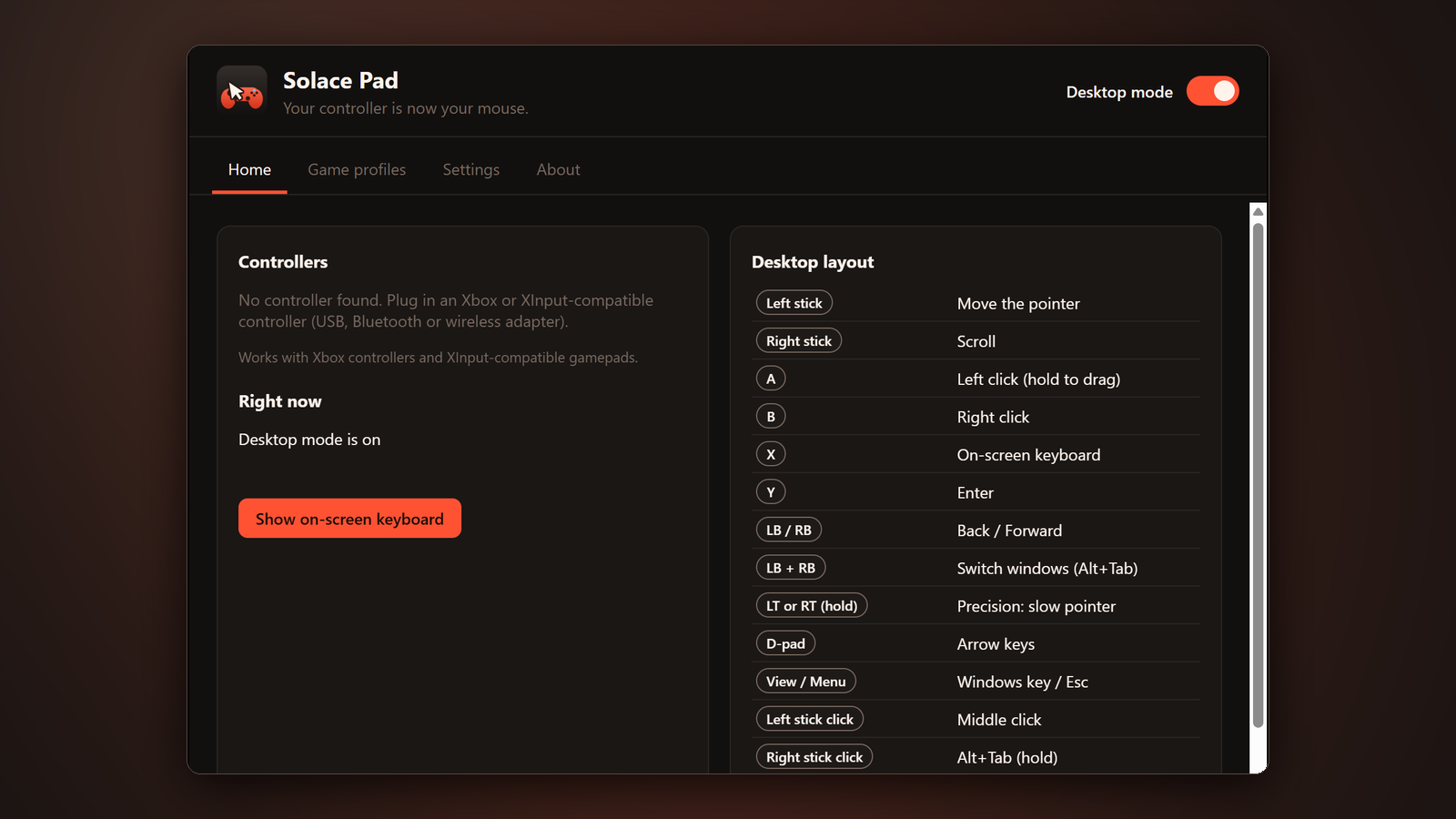
Trial captures with sample data. Solace Pad runs on your Windows PC.
After you buy, you can check that your download is exactly this file: same name, same size, same SHA-256.
- File
- Solace-Pad-1.0.0-Windows-x64-unsigned.zip
- Size
- 2963130 bytes
- SHA-256
b92c953cc4c98d794a96dc21ea6b8011738aabd32a0f98387d0a0622cbe7ddab
ABOUT THIS PRODUCT
The story behind Solace Pad
Pick up your controller and the desktop follows. The left stick moves the pointer, and holding a trigger switches to precision mode for small buttons and links. The right stick scrolls, A and B are left and right click (hold A to drag), Y is Enter, the D-pad gives you arrow keys, and View and Menu are the Windows key and Esc. LB and RB go Back and Forward in your browser, and LB+RB together switch windows like Alt+Tab.
Press X for a big on-screen keyboard that never steals focus from the window you're typing into, so search boxes and address bars just work. Move with the D-pad or stick, A types, B is backspace, Y is space and LT is shift. For games that don't support a controller, make a game profile: map its buttons and sticks to keys or mouse actions (pointer, scroll, WASD or arrow keys), and the profile turns on by itself whenever that game is in front. When you play a game that already supports controllers, hold View+Menu to turn desktop mode off, and again to bring it back.
Solace Pad sits in the system tray, uses about 30 MB of RAM, installs no driver and can start with Windows if you want. It works with Xbox controllers and XInput-compatible gamepads, up to four at once. Other controllers aren't supported in 1.0, and the app tells you if you plug one in. In 1.0, windows that run as administrator (like Task Manager) and Windows' own admin prompts don't respond to the controller's clicks and keys. No account, no telemetry; it contacts SolaceSoftware only when you click Check for updates.
Usage disclaimer
Use SolaceSoftware products only for lawful, authorized purposes. Use only content, data, images, audio, and other material you have the rights and any necessary consent to use.
You are responsible for what you provide, create, and share. Do not use our products for fraud, deceptive impersonation, harassment, or other unlawful or abusive activity. Follow applicable laws, platform rules, and third-party licenses.
Software and AI outputs can contain mistakes. Review results before relying on them, publishing them, or sharing them with others.
Unzip the download and run Solace-Pad-1.0.0-Setup.exe. It installs for your Windows user only and adds Start menu and desktop shortcuts.
Solace Pad runs in the system tray; closing the window keeps it running. Hold View + Menu to turn desktop mode off and on.