SOLACESOFTWARE / PRODUCT
Solace Media Finder
Find every photo, video and song on your PC in one table, sort and filter them, and move or organize them into folders, with Undo. $19.99, once.
One-time payment for the current Windows package. 14-day money-back guarantee. No automatic renewal.
After checkout, Stripe brings you back to a page with your Download button. Bookmark it: the download works in the browser you paid with, for 30 days.
Email us at solacesoftware@smilingface.cloud with questions.
- Scans all your drives (and folders you add) for photos, videos and audio, and catalogs them in one table
- Sort by any column, filter by Photos, Videos or Audio, and search by name
- Move files to a folder you pick, or organize them into Type\Year\Month folders
- Never overwrites a file, asks you to confirm first, and Undo last move puts the last batch back
- No player, no previews and no delete; no network connections, no updater, no telemetry
- Windows ZIP; verify the published SHA-256 before use
- One-time price, $19.99 USD. No subscription and no automatic renewal.
- Works offline: the app itself makes no network calls (see the details below).
- We publish the size and SHA-256 of the exact ZIP you download, so you can check it.
The app isn’t code-signed yet, so the first time you open it Windows may show “Windows protected your PC.” Click More info, then Run anyway. After you buy, you can check the ZIP against the SHA-256 on this page. Questions: solacesoftware@smilingface.cloud
After you buy, you can check that your download is exactly this file: same name, same size, same SHA-256.
- File
- SolaceMediaFinder-1.0.0-win64.zip
- Size
- 3002543 bytes
- SHA-256
99952ca16b4932cb2ce4d4dde1b6149e11d624790b013ca9f19bbfe5822ca3eb
ABOUT THIS PRODUCT
The story behind Solace Media Finder
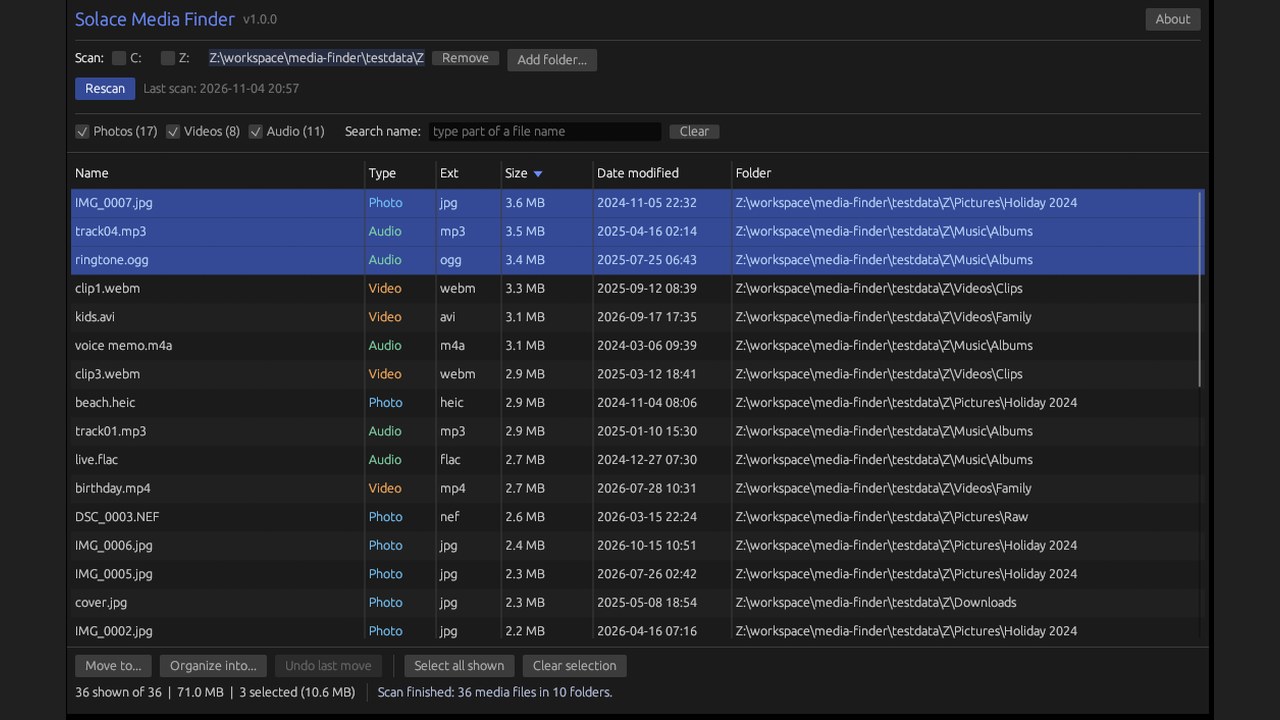
Solace Media Finder scans every fixed drive on your PC, plus any folders you add, for photos, videos and music, and lists them in one table with name, type, extension, size, date modified and folder. Click a column heading to sort, tick Photos, Videos or Audio to filter, or type part of a file name to narrow the list.
Select files with a click, Ctrl+click, Shift+click or Ctrl+A, then Move to... a folder you pick, or Organize into... Type\Year\Month folders such as Photos\2024\03-March. You confirm first, nothing is ever overwritten (a name clash gets a number, like "photo (1).jpg"), and Undo last move puts the files from the most recent move or organize back where they were, even after a restart.
The list is saved on your PC, so it opens instantly next time, and Rescan refreshes it. Windows, Program Files and AppData folders are skipped on purpose. It does nothing else: no player, no previews, no editing and no deleting. The app makes no network connections and sends nothing anywhere, and there is no updater and no telemetry.
Usage disclaimer
Use SolaceSoftware products only for lawful, authorized purposes. Use only content, data, images, audio, and other material you have the rights and any necessary consent to use.
You are responsible for what you provide, create, and share. Do not use our products for fraud, deceptive impersonation, harassment, or other unlawful or abusive activity. Follow applicable laws, platform rules, and third-party licenses.
Software and AI outputs can contain mistakes. Review results before relying on them, publishing them, or sharing them with others.
Unzip the folder anywhere and double-click solace-media-finder.exe; there is no installer. Windows may show "Windows protected your PC" (SmartScreen) because the build is unsigned: click More info, then Run anyway.
Tick the drives to scan, press Scan this PC, then sort, filter and select files. Move to... and Organize into... ask you to confirm first, and Undo last move puts the most recent batch back. The list is saved at %LOCALAPPDATA%\SolaceMediaFinder\catalog.db.