SOLACESOFTWARE / PRODUCT
Solace Clock
A clean digital clock that floats on your Windows desktop. Pick a format, a theme and a size, and it stays out of the way.
Tested: on 5.6.0-solace.1, no network connections from launch to exit, no admin rights, and nothing to install: unzip and run.
One-time payment for the current Windows package plus 12 months of best-effort SolaceSoftware support and packaging updates. No automatic renewal.
14-day refund if the package can't start its core check — see Purchase terms.
Questions before you buy, or help after: solacesoftware@smilingface.cloud. A person replies, and we aim to answer within three business days.
Guide: An always-on-top desktop clock for Windows 11.
- One-time price, $18.39 USD. No subscription and no automatic renewal.
- Works offline: the app itself makes no network calls (see the details below).
- We publish the size and SHA-256 of the exact ZIP you download, so you can check it.
- A person answers your email, with 12 months of best-effort support included.
This download is unsigned. Windows may say “Windows protected your PC.” We’re a new publisher and haven’t bought a code-signing certificate yet. Click More info → Run anyway. Then check the ZIP against the SHA-256 on this page. Questions: solacesoftware@smilingface.cloud
IN THE APP
Screenshots
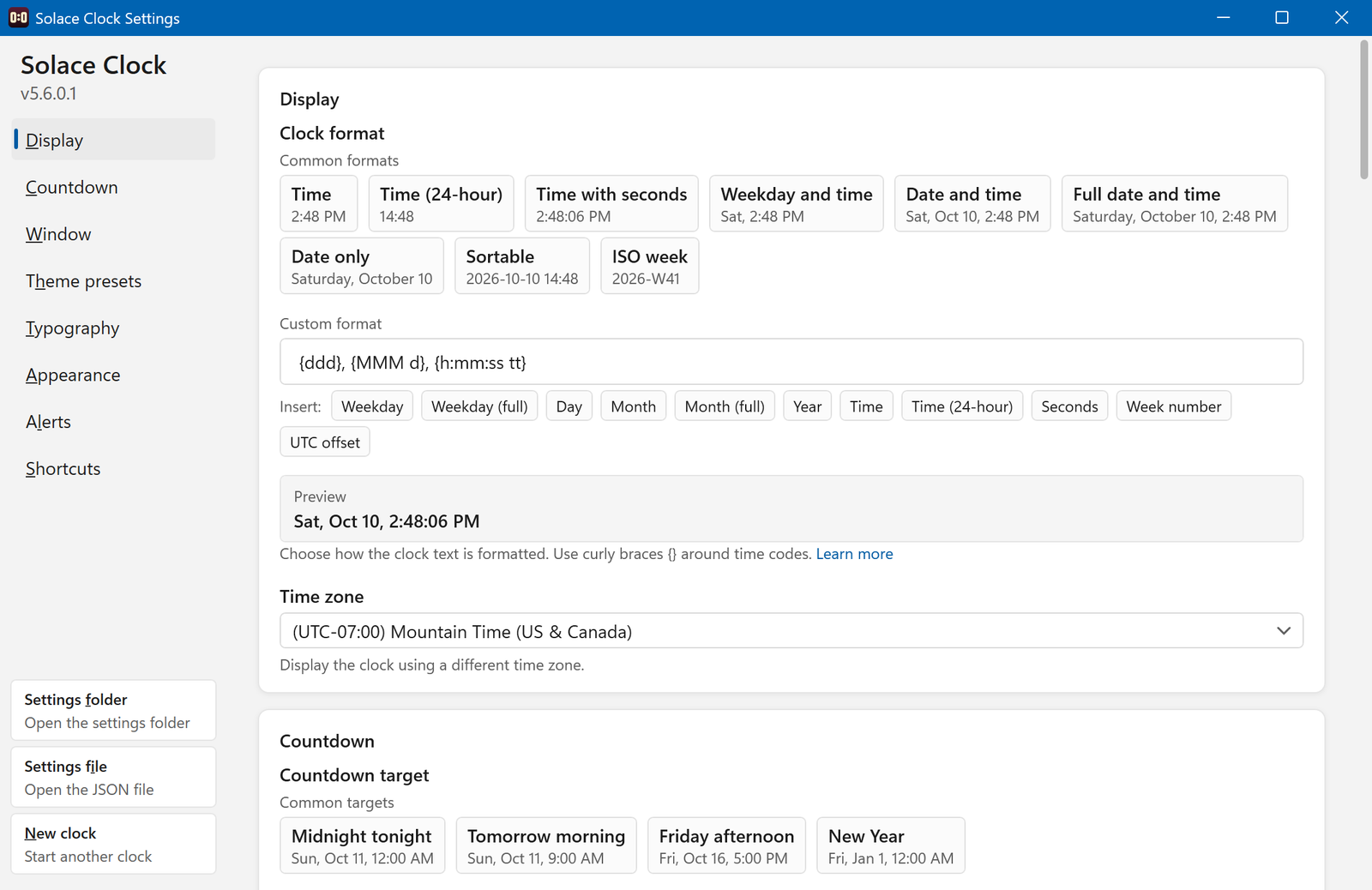


Trial captures with sample data. Solace Clock runs on your Windows PC.
After you buy, you can check that your download is exactly this file: same name, same size, same SHA-256.
- File
- Solace-Clock-5.6.0-solace.2-Windows-x64-unsigned.zip
- Size
- 1271497 bytes
- SHA-256
0b150d582a9994c60bb2139c72fb7e7c25c276fec8d54bedad88cfa5e7be22dc
ABOUT THIS PRODUCT
The story behind Solace Clock
The taskbar clock is tiny and hidden behind full-screen windows. Solace Clock puts the time where you can see it: a borderless readout you drag anywhere on the desktop, sized and styled the way you like.
Choose a date and time format from presets or write your own, switch on a countdown to a date, set the clock to any time zone (use New clock in Settings to run a second clock for another zone next to your local one), pick a theme or your own colors and font, and keep it on top of other windows if you like. A tray icon brings it back when it is hidden. Settings live in %AppData%\Solace Clock (or next to the app if you keep a settings file there for portable use). It makes no network connections and has no account.
Usage disclaimer
Use SolaceSoftware products only for lawful, authorized purposes. Use only content, data, images, audio, and other material you have the rights and any necessary consent to use.
You are responsible for what you provide, create, and share. Do not use our products for fraud, deceptive impersonation, harassment, or other unlawful or abusive activity. Follow applicable laws, platform rules, and third-party licenses.
Software and AI outputs can contain mistakes. Review results before relying on them, publishing them, or sharing them with others.
Keep SolaceClock.exe and SolaceClock.exe.config together in the same folder.
Turn off Start with Windows in Settings before deleting the app folder.
Play sound when countdown ends is on by default and plays the WAV file you choose in Settings > Alerts. No WAV file is set by default, so the clock stays silent until you pick one.