SOLACESOFTWARE / PRODUCT
Solace Clack
Satisfying key sounds as you type. Solace Clack gives any keyboard on Windows 10 and 11 mechanical keyboard sounds in every program, with 8 sound profiles. $4.59 once.
One-time payment for the current Windows package plus 12 months of best-effort SolaceSoftware support and packaging updates. No automatic renewal.
14-day refund if the package can't start its core check — see Purchase terms.
Questions before you buy, or help after: solacesoftware@smilingface.cloud. We aim to answer within three business days.
- One-time price, $4.59 USD. No subscription and no automatic renewal.
- Works offline: the app itself makes no network calls (see the details below).
- We publish the size and SHA-256 of the exact ZIP you download, so you can check it.
- Email support, with 12 months of best-effort help included.
This download is unsigned. Windows may say “Windows protected your PC.” We’re a new publisher and haven’t bought a code-signing certificate yet. Click More info → Run anyway. Then check the ZIP against the SHA-256 on this page. Questions: solacesoftware@smilingface.cloud
IN THE APP
Screenshots
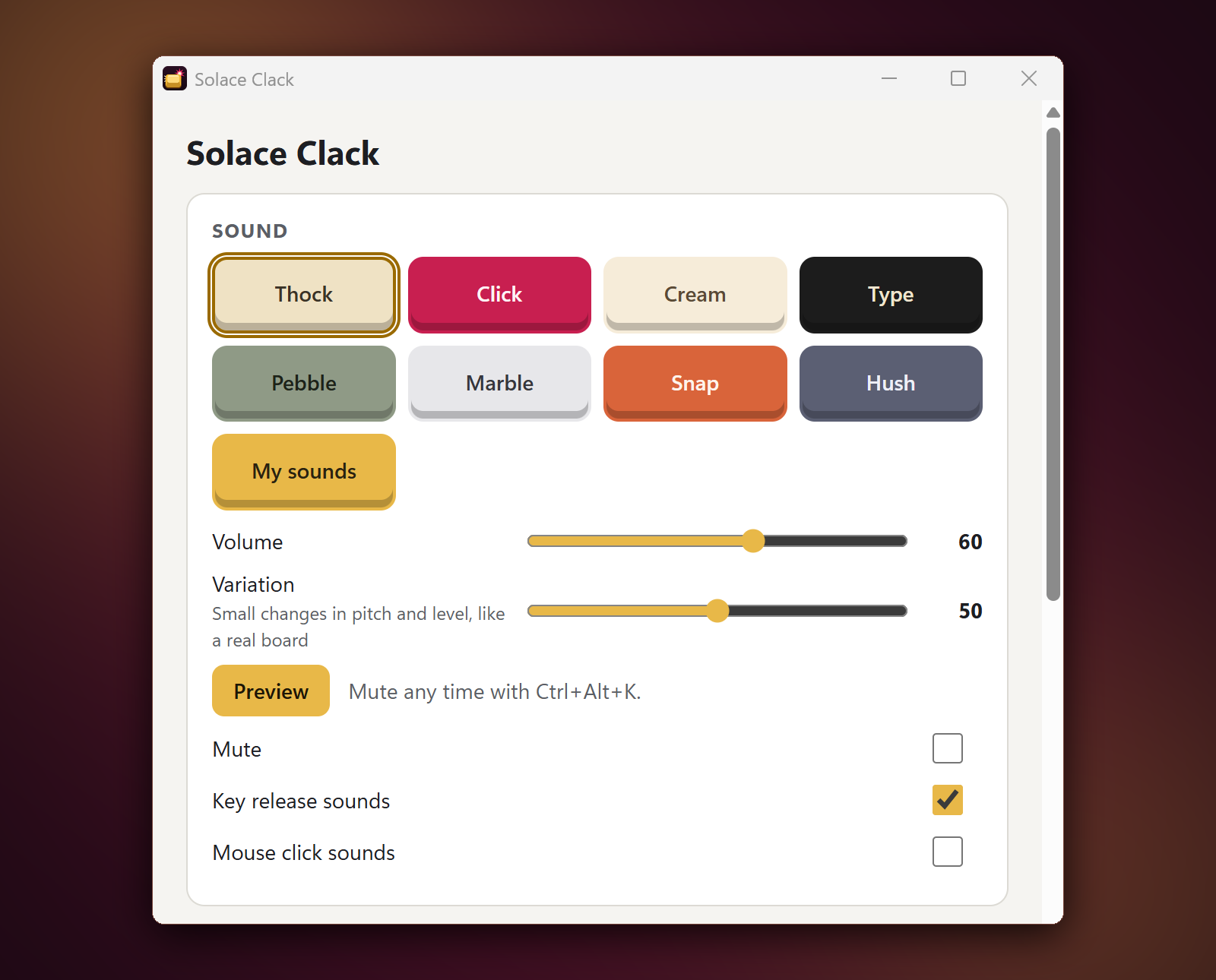
Trial captures with sample data. Solace Clack runs on your Windows PC.
After you buy, you can check that your download is exactly this file: same name, same size, same SHA-256.
- File
- Solace-Clack-1.0.0-Windows-x64-unsigned.zip
- Size
- 2077761 bytes
- SHA-256
291e8e26bb17a538c0b4ac5813107332b9a38566894740f2dfe930d3ca95f195
ABOUT THIS PRODUCT
The story behind Solace Clack
Satisfying key sounds as you type, on any keyboard. Solace Clack sits in the tray and plays a keystroke sound in every program, whether you're writing, coding or chatting. Sound is placed left or right by key position, best on headphones. Space, Enter and Backspace get their own deeper sound, and holding a key down plays one sound, not a stream. On our test PC, sound followed a key press in about 17 ms.
Pick from 8 profiles: Thock, Click, Cream, Type, Pebble, Marble, Snap and Hush. Every sound is generated by our own sound engine, not recorded, and a variation slider adds small changes in pitch and level so it doesn't sound like a loop. Turn key release and mouse click sounds on or off, set the volume and preview a profile before you pick it. Prefer your own? Point "My sounds" at a folder of .wav files.
It knows when to be quiet. Solace Clack pauses automatically when your microphone is in use, when a listed anti-cheat game is running, or when a program you list is in front. The tray tooltip and menu show why it's quiet. Press Ctrl+Alt+K in any program to mute it yourself. It only sees which key was pressed, to pick a sound, and never records, saves or sends what you type. It never goes online, and in the tray it used about 27 MB of memory and 0.1% CPU on our test PC. One honest limit: Windows doesn't let it hear keys while a program running as administrator is in front, or on the sign-in and admin prompt screens.
Usage disclaimer
Use SolaceSoftware products only for lawful, authorized purposes. Use only content, data, images, audio, and other material you have the rights and any necessary consent to use.
You are responsible for what you provide, create, and share. Do not use our products for fraud, deceptive impersonation, harassment, or other unlawful or abusive activity. Follow applicable laws, platform rules, and third-party licenses.
Software and AI outputs can contain mistakes. Review results before relying on them, publishing them, or sharing them with others.
Unzip the download and run Solace-Clack-1.0.0-Setup.exe. It installs for your Windows user only and adds a Start menu entry.
Solace Clack lives in the tray; left-click the icon for Settings. Ctrl+Alt+K mutes. Uninstalling removes the app, its settings and its start-with-Windows entry.